

Skip to content
Integrations Salesforce
Salesforce Integration

Encrypted file exchange inside every Salesforce case

Add end-to-end encrypted file exchange to Salesforce Cases and Experience Cloud. Agents collect sensitive files without customers leaving the portal.

Request Demo Install from AppExchange
0
max file size
0
on G2
0
end-to-end encrypted
0
split-key architecture

Customer service: encrypted files inside every case

Your service desk shouldn't store sensitive data.

Our native app embeds directly into Salesforce Cases so agents and customers can exchange end-to-end encrypted files without leaving the platform. No extra software for customers to install — they receive a secure link and verify their identity before downloading. Large file support up to 100 GB included.

Works across Salesforce Cases and Experience Cloud. Every file is encrypted on the sender's device. Nobody, not even SendSafely, can access the contents.
Salesforce Salesforce — Case #00045782
Request: Loan Application Documents
Customer: Sarah Chen • Priority: High
Agent note • 3m ago
Hi Sarah, please use the secure link below to upload your income verification documents. Your files will be end-to-end encrypted.
SendSafely Encrypted Upload
End-to-end encrypted • Files expire in 7 days
Active
Recent Upload
Income_Verification_SarahChen.pdf
Encrypted • 312 KB • Uploaded just now
lightning.force.com · SendSafely package
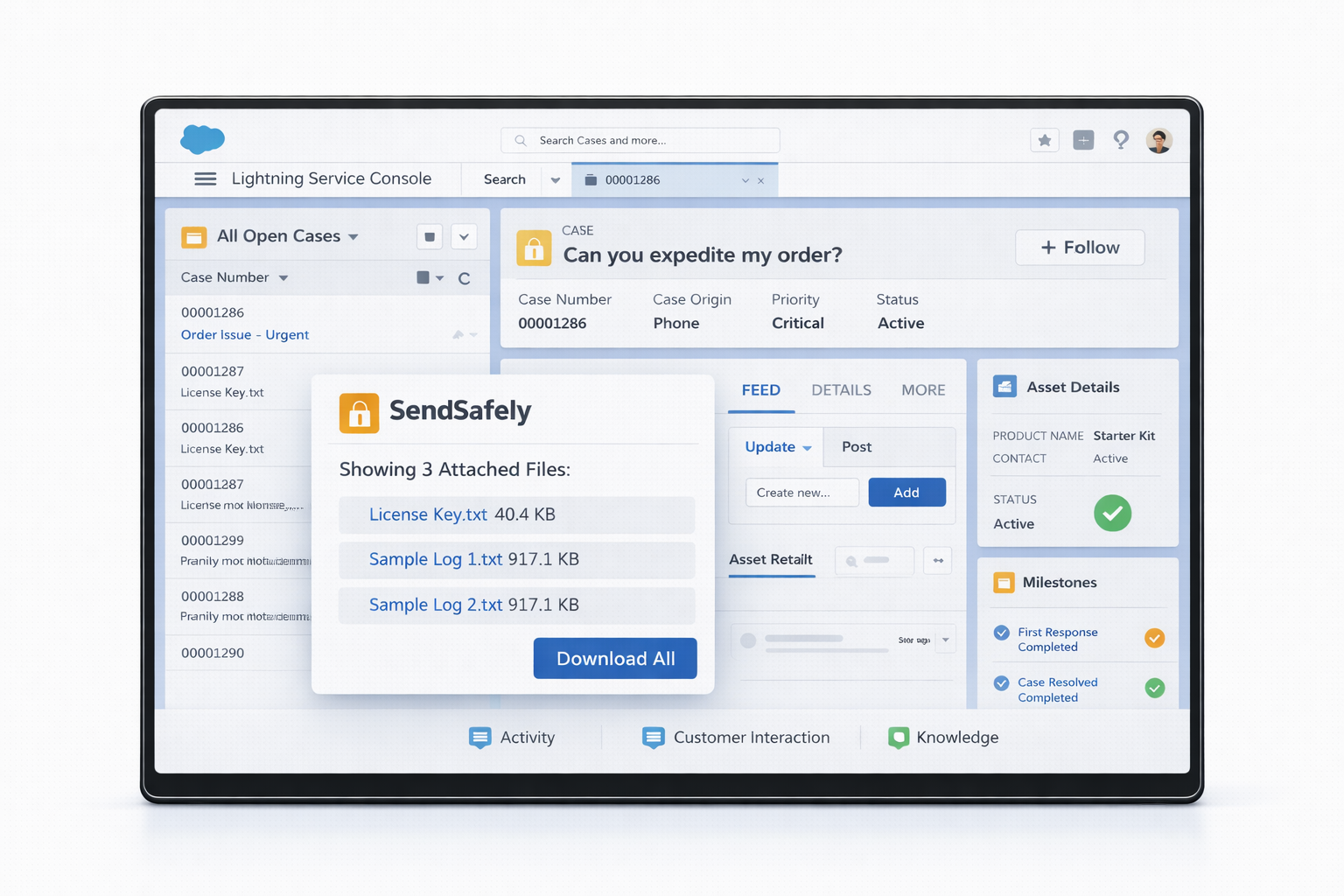
SendSafely installed in Salesforce, shown inside the Lightning interface as a native package
SendSafely runs as a native package inside your Salesforce org — no rip-and-replace, no extra portals.

Up and running in minutes

No code required. Install from AppExchange and start collecting encrypted files inside Salesforce Cases immediately.

1
Install

Add SendSafely from the Salesforce AppExchange in one click. No code required. Works with your existing Salesforce org.

2
Collect

Agents request encrypted files directly inside Cases. Customers upload without leaving Salesforce — no extra software to install.

3
Protect

Every file is end-to-end encrypted. Salesforce never sees the contents. Download tracking notifies agents the moment a file is accessed.
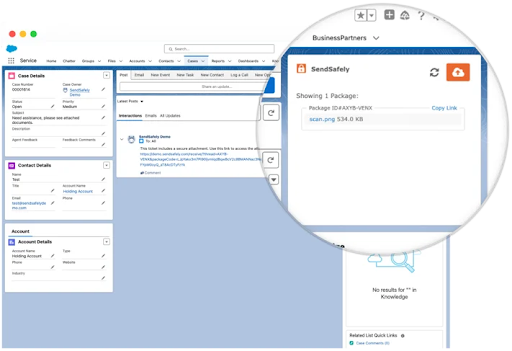
lightning.force.com · Service Cloud case
SendSafely encrypted file upload component on a Salesforce Service Cloud case detail page
Inside a Service Cloud case — agents collect encrypted files without leaving the Case detail.
Key Features

Everything your support team needs to collect sensitive files

SendSafely embeds natively into Salesforce so agents never leave the Case workflow. Customers upload once. Files are encrypted before they touch any server.

View on AppExchange
Native Case Integration Embedded directly in the Salesforce Case interface
Experience Cloud Support Encrypted file upload from customer-facing portals
Agentforce AI (HALO) AI agents collect encrypted files autonomously 24/7
Large File Support Files up to 100 GB, no email attachment limits
Automatic Expiration Files auto-expire based on configurable policies
Download Tracking Real-time notifications when files are accessed
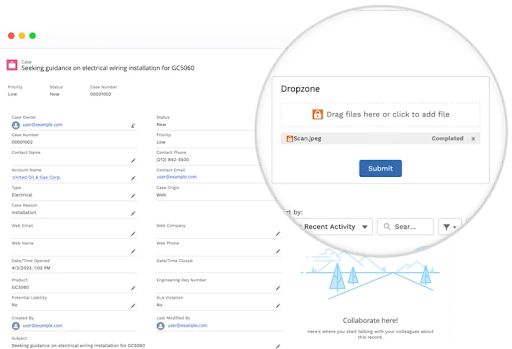
community.force.com · Experience Cloud portal
Salesforce Experience Cloud customer portal with a SendSafely encrypted upload widget for partners and customers
Experience Cloud portal — partners and customers upload encrypted files directly from the portal they already use.
HALO for Salesforce Agentforce

AI agents that collect encrypted files autonomously

HALO encrypts files before they reach any server.

HALO is SendSafely's encrypted file collection layer for AI agents. When Salesforce Agentforce handles document intake, HALO ensures every file is end-to-end encrypted before it touches any infrastructure — without human intervention. Customers upload once in the Experience Cloud portal. AI agents process the intake. Files are encrypted the entire way.

No workflow changes required. HALO drops directly into your Agentforce configuration and encrypts every file autonomously, 24 hours a day.
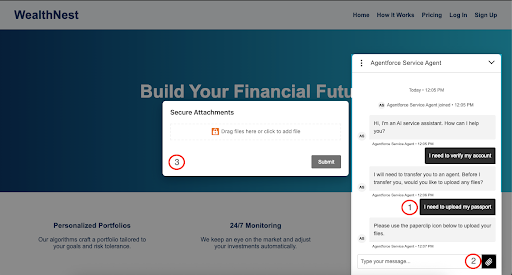
Agentforce AI Workflow
Customer opens Experience Cloud
Agentforce AI agent greets the customer and requests documents.
HALO encrypts on upload
Every file is encrypted client-side before leaving the customer's device.
AI completes intake autonomously
Agentforce routes the encrypted case to the right team. No human intervention required.
lightning.force.com · Agentforce + HALO
Salesforce Agentforce configuration showing the SendSafely HALO action wired into an AI agent workflow
HALO inside Agentforce — SendSafely drops into the AI agent configuration so file intake stays end-to-end encrypted.
Split-Key Architecture

Files are encrypted before they reach any server

Only the sender and recipient can decrypt your data.

Every file is encrypted on the sender's device using end-to-end encryption before it leaves the browser. Salesforce never sees the file contents. SendSafely never sees the file contents. Only the intended recipient can decrypt and download.

SendSafely is audited annually and maintains the following compliance certifications for regulated industries.

Compliance & Certifications
SOC 2 Type 2 HIPAA PCI DSS GDPR CCPA
Architecture Highlights
Client-side encryption
Files are encrypted on the sender's device before upload. Only the recipient's key can decrypt.
Split-key architecture
SendSafely infrastructure stores only encrypted ciphertext — never the keys or plaintext.
Full audit trail
Every download, access event, and expiration is logged with timestamps for compliance reporting.

Ready to encrypt your Salesforce workflows?

See how SendSafely embeds end-to-end encrypted file exchange into every Salesforce Case. Set up in minutes, not months.

Request Demo