Skip to content
Home Security Overview

Security Overview

SendSafely uses several layers of security to protect your information. This page explains the various security protocols we use to protect your data.

The SendSafely Trust Center

Visit the SendSafely Trust Center, powered by Safebase, to explore our platform's security measures, review our company's security policies, and access our extensive compliance documentation.

If you need to complete a Security Questionnaire or require our SOC2 Type 2 report, this is your essential starting point. Stay informed by subscribing to our updates and receive the latest security and privacy news directly, including notifications about updates to our Subprocessor list.

CCPA GDPR HIPAA Payment Card Industry SOC2

How Files and Messages are Encrypted

All files and messages you send through our platform are protected using end-to-end encryption. End-to-end encryption means that nobody other than you and the individuals you authorize can read them. There is no way for SendSafely, or any third party, to decrypt this information. Even if the data is intercepted, stolen or seized, it cannot be read without the proper decryption keys, which are never stored or accessible by our systems. The “How it Works” page provides an introductory high-level illustration of SendSafely’s encryption flow. In order to successfully access the contents of a SendSafely package the authorized recipient must firstly successfully authenticate to the SendSafely platform AND also have the required package link containing the valid client secret key as described below.

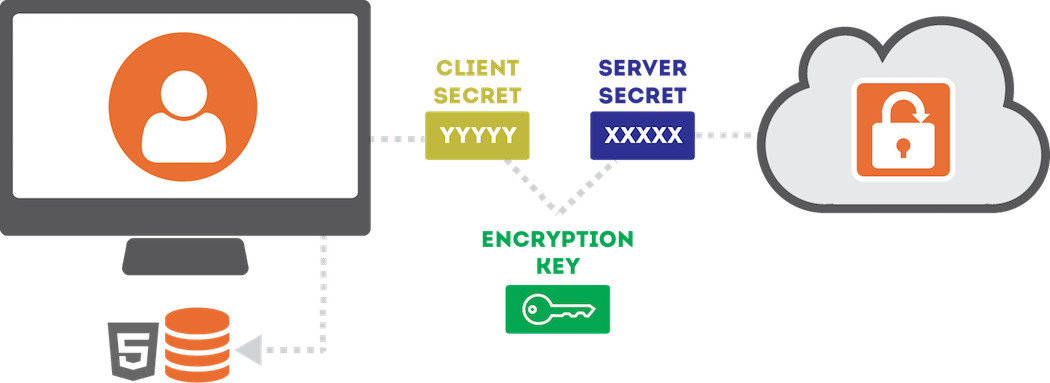
Every set of files or messages that you send through SendSafely are encrypted on your machine before being submitted to our servers. We use the OpenPGP message format, with a key that is derived using OpenPGP's Iterated and Salted (Type 3) String-to-key (S2K) specifier. The Type 3 S2K converts a variable length pass-phrase into a 256-bit symmetric AES encryption key. The pass phrase that is used consists of 512 random bits of data and is a combination of the following two values:

The Server Secret and Client Secret combine to derive the AES encryption key

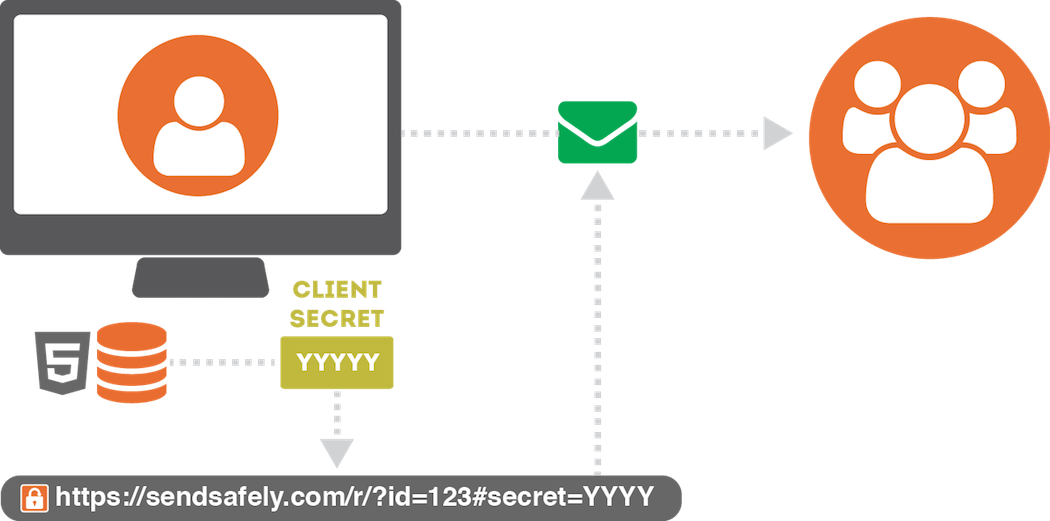
The Server Secret is stored by us, and provided to your recipients along with the file once we verify their identity. The Client Secret, however, is never disclosed to our servers and remains on your machine at all times. The Client Secret is sent directly by you to them within the Secure Link needed to access the items. When you want to share access with someone else, you (the sender) provide them each with a Secure Link that includes the Client Secret embedded within URL Fragment Identifier.

The Secure Link carries the Client Secret inside the URL fragment identifier

Because this value is embedded within the URL Fragment Identifier, it is never visible to our server (even when the link is clicked by the user). Instead, the value is used by our client-side API and combined with the Server Secret to recomputed the AES Key needed to decrypt the items.

Trusted Device Keys

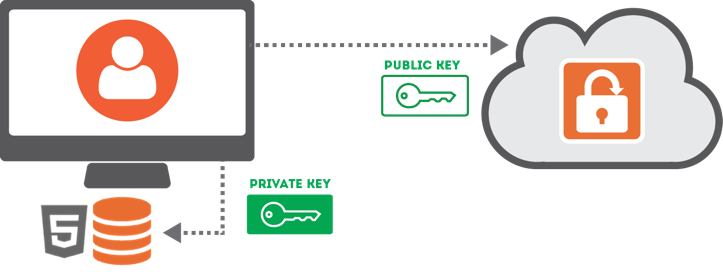
Trusted device keys are a secondary encryption method we use to make it easy for you to access items. Any time you log in from a new browser, SendSafely will ask you if you want to trust the browser. If you choose YES, your browser generates a 2048-bit RSA Public/Private key pair. The private key is never submitted to SendSafely, it gets stored in your browser’s local storage. The public key gets uploaded and stored by SendSafely.

The browser generates an RSA key pair; only the public key is uploaded to SendSafely

Once you have a trusted browser, the server will provide a copy your trusted browser public key to users that send you items. The public key is then used to encrypt a copy of the Client Secret for that item, and the encrypted Client Secret gets uploaded to SendSafely. This lets us provide you with access to all of your received items using a trusted browser, eliminating the need for the sender to share a secure link with you.

Portal Master Key

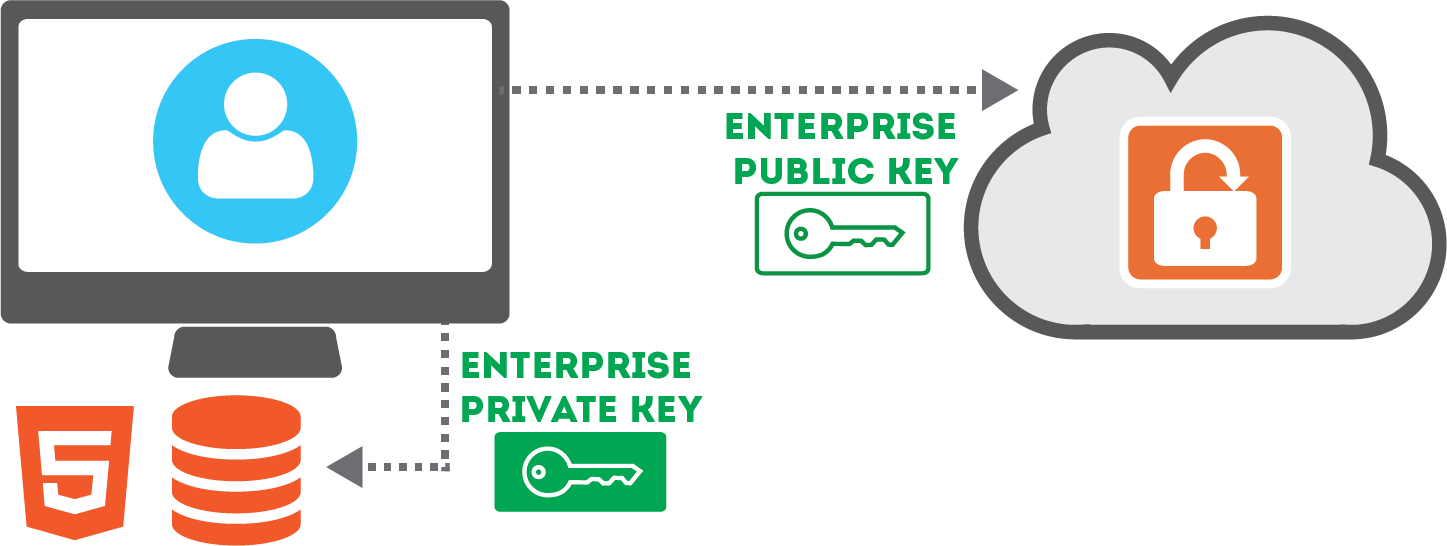
SendSafely Enterprise and Business customers can leverage our portal master key feature. The SendSafely portal master key is a public/private key pair that is compliant with the OpenPGP (RFC4880) standard. Unlike regular encryption keys, where the same key is used to encrypt and decrypt information, public/private keys each only perform one of those functions (not both). Anything encrypted with the public key can only be decrypted with the private key. The private key is secret, managed by the customer organization, and never provided to SendSafely.

The enterprise public key is stored in the SendSafely portal while the enterprise private key remains in the administrator's browser

The master public key is not secret and is provided to SendSafely and stored within the portal. The master private key is secret and is not provided to SendSafely. The master private key is only available to trusted company administrators and can be securely stored in their browser for use as needed.

Every time someone sends an item through the SendSafely portal, the sender’s machine will automatically receive a copy of the portal master public keys in order to encrypt and upload a copy of the Client Secret. Since only the master private key can be used to decrypt the Client Secret, you can be assured that SendSafely still won’t have the ability to decrypt these secrets.

Local Storage Encryption

SendSafely’s security model relies on storing private key material within your browser’s HTML5 Local Storage. Your browser automatically protects this information by making sure that other websites are not allowed to access the information we store there. As an additional safeguard, SendSafely encrypts this information using a 128-bit AES key that is unique to your user account. The key is generated by us when you create your account, and stored on our servers. We only reveal this key to your browser while you are logged into our site. That way if someone else gains access to your local storage, the SendSafely information we store there cannot be viewed.

Two Factor Authentication

SendSafely has begun mandating Two-Factor Authentication (2FA) for customer accounts that use a SendSafely username and password. Enforcement is enabled by default for new portals, and portal administrators can require it for all password-based users. SendSafely supports one-time SMS codes and authenticator apps such as Google Authenticator, Duo Mobile, and Authy. Users who authenticate through Single Sign-On or their Google account use those providers’ authentication controls and are excluded from SendSafely’s native 2FA enforcement.

Along with strong, unique passwords and organizational access controls, 2FA helps protect accounts against takeover if a user ID and password are compromised, guessed, or phished.


Web Application Security

In addition to the encryption mechanisms described above, all communications between the SendSafely servers and your web browser or mobile application are encrypted using HTTPS/TLS (Transport Layer Security). The use of HTTPS/TLS provides an additional layer of encryption on top of the end-to-end encryption already used for file and messages, and is used to safeguard client-server communications and mitigate man-in-the-middle attacks. The HTTP Strict Transport Security header is used across our site to prevent anyone from attempting to fool your browser into making requests to our site that to not use HTTPS/TLS. We also maintain an A+ rating from SSL Labs.

To protect users from cross-site scripting attacks (XSS), SendSafely’s web application uses the Content Security Policy standard to declare approved sources of content that are allowed to run within the web application. Only approved sources of client-side code are permitted, so unauthorized attempts to inject JavaScript script into our application will be blocked.

Privacy, Anonymity and Metadata

SendSafely protects the contents of the files and messages you exchange, however SendSafely is not designed to be an anonymous system. Our goal is to keep your data private while providing all of the core features you expect. Our servers have no knowledge of your message contents, but we do store things like your email address, phone number, contacts, and file names. SendSafely also stores additional data such as the time you logged-in, who you send items to, and the IP address you use to access the site. SendSafely will never disclose any of this information or share it with third parties, except when needed in order to fulfill our operations.

Vulnerability Testing

Our engineering team has strong security-related background and experience, however we know that no system is perfect. In order to identify potential security issues, our platform is tested by industry leading Cyber Security companies. We also perform internal security audits on a regular basis and operate a public Bug Bounty Program. Additionally, we have partnered with edgescan for continuous external vulnerability scanning of our systems.

If you think you've identified a security issue please submit the details to us using our Security Bug Reporting Form. Our team will work with you to verify the issue and make sure it gets corrected quickly.

Visit the SendSafely Trust Center, powered by Safebase, to learn more.

System and Organization Controls (SOC) Report

SendSafely’s internal controls, policies and procedures related to the AICPA Trust Service Criteria (Security) are audited annually by an independent third party examiner. SendSafely enterprise customers that are on a paid Business/Enterprise plan may request a copy of the latest SOC report by contacting privacy@sendsafely.com.

SOC 2 Type 2
Get started

Questions about how SendSafely is secured?

Request the SOC 2 Type 2 report, complete a security questionnaire, or talk to our team about your requirements.