
Skip to content
Integrations Outlook + Gmail
+
SendSafely
Outlook + Gmail integration

Encrypted attachments inside Outlook and Gmail.

Secure email your way. Use native Outlook and Gmail integrations for user-driven encryption, or deploy the Serverless Email Gateway to automatically encrypt email across your organization using policy-based rules.
Request Demo Install in Outlook Install in Gmail
0
max file size
0
native email plug-ins
0
end-to-end encryption
0
recipient accounts required
Native email plug-ins

Encrypted file transfer that lives in your inbox

Your team keeps writing email. The attachments stop leaking.

Choose from two native plug-ins — one for Microsoft Outlook (desktop, web, and Microsoft 365) and one for Gmail in Chrome. Senders click the SendSafely button in the compose window to replace attachments with end-to-end encrypted secure links, or encrypt the entire email message instead. Recipients click the link, verify their identity, and download — no SendSafely account required on the other end.

Files and messages are encrypted on the sender's device with OpenPGP. Microsoft, Google, and SendSafely all see ciphertext only. The decryption key never sits in one place.

New message — SendSafely
To:alex.martin@partnerfirm.com
Signed onboarding documents

Hi Alex — attached are the signed contracts. Documents have been encrypted with SendSafely. You'll be asked to verify your identity before downloading.

Contract_2026_Q1.pdf Encrypted · 4.2 MB · Expires in 7 days
Sealed
NDA_signed.pdf Encrypted · 612 KB · SMS verification on
Sealed
How it works

A three-step flow, right inside the compose window

Admin installs the plug-in once. When a message needs protection, the sender chooses the SendSafely attach button and picks the files — the add-in encrypts them on the sender's device, then the email goes out carrying a secure link instead of the raw file. It's a deliberate action in the sender's hands. Plaintext never leaves the machine.

inbox — sendsafely native plug-in
Inbox
Sent
Drafts
Encrypted
From:SendSafely <notify@sendsafely.com>
Your encrypted attachments are ready

The recipient has been notified. Files are stored encrypted and will expire on your configured schedule.

3 files · 28 MB total End-to-end encrypted · OpenPGP · Identity verification on
Sealed
1
Admin install
Push the plug-in centrally via Microsoft 365 admin or Google Workspace admin — or let users install it themselves from the marketplace.
2
User attaches with SendSafely
When a message needs protection, the sender clicks the SendSafely attach button in the compose window and picks the files. The add-in encrypts them on the sender's device before they upload — an explicit choice, not a silent rewrite of every email.
3
Recipient verifies
The email arrives with a SendSafely link. Recipient verifies identity (PIN or SMS) and downloads. No account needed. Every access is logged.
Microsoft Outlook

Native plug-in for Outlook desktop, web, and Microsoft 365

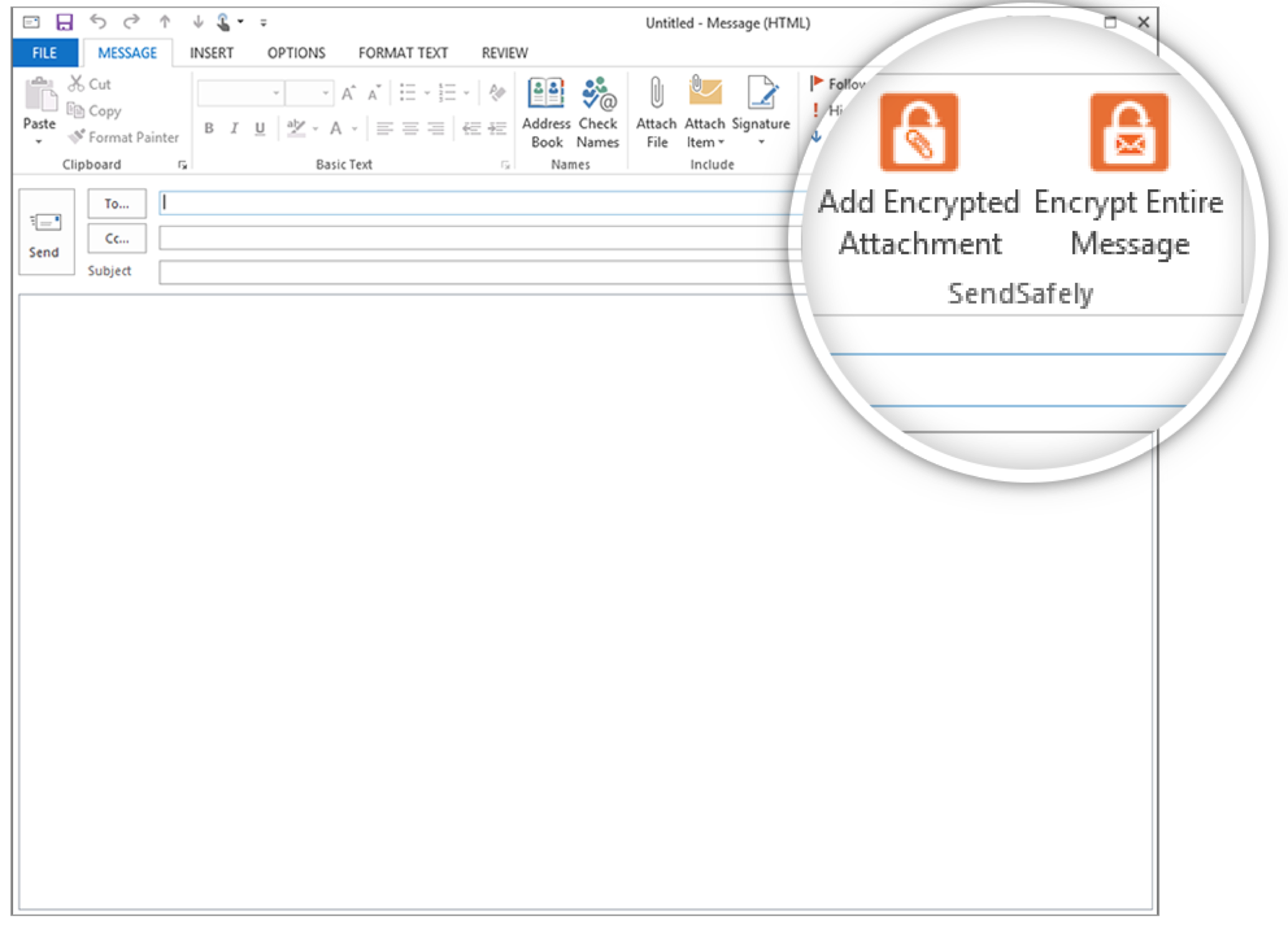
The SendSafely Outlook plug-in installs as a standard Office add-in. It adds an encrypted-attachment button to the Outlook ribbon so the sender can choose to send a file or message securely.  Files and messages are encrypted on the sender's machine before they reach an Exchange or Microsoft 365 server.

  • Files up to 100 GB — no Exchange attachment limits
  • OpenPGP, end-to-end encryption at rest and in transit
  • No recipient account — one click, identity verification, done
  • Recipient identity verification on every download (PIN, SMS, or SSO)
  • Background upload — email auto-sends when the encrypted upload finishes
  • Full audit trail of every send, open, and download for compliance reporting
SendSafely encrypted attachment inside the Microsoft Outlook compose window
SendSafely's encrypted-attachment panel inside Outlook compose
Gmail & Google Workspace

A Chrome extension that turns every Gmail compose into a secure send

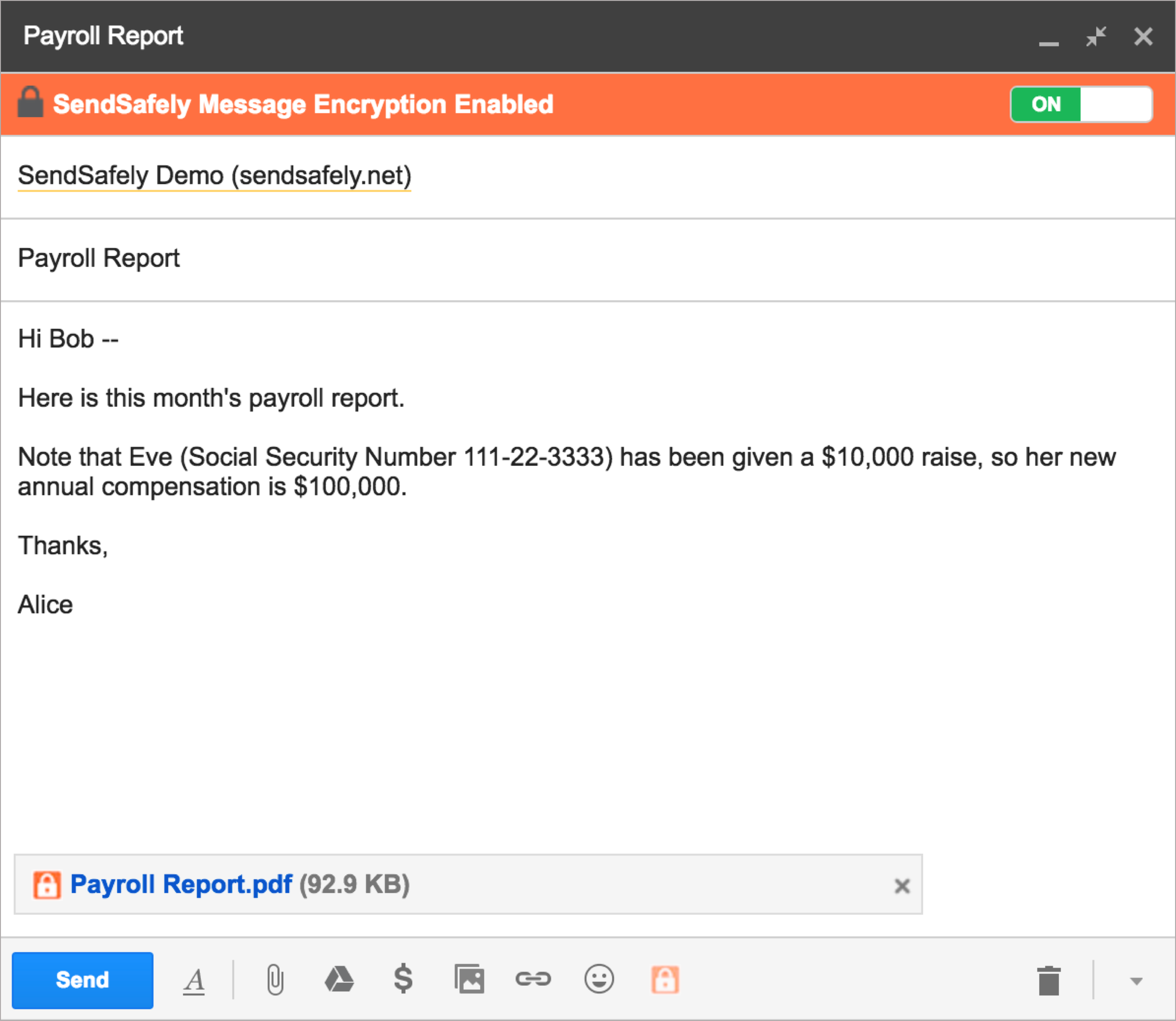
The SendSafely Chrome extension adds optional 'Message Encryption' and “Attach with SendSafely” buttons to the compose window. Messages and Files are encrypted in the browser before they ever touch Google's servers and replaced with a one-time secure link. The same extension doubles as a standalone Chrome popup for non-Gmail sends.

  • Large-file support — send well above Gmail's 25 MB attachment limit
  • OpenPGP, end-to-end encryption at rest and in transit
  • No recipient account — works for anyone with an email address
  • Recipient identity verification with PIN, SMS, or SSO
  • Standalone popup mode — encrypted sends from any web app or local file
  • Full audit trail of every send, open, and download for compliance reporting
SendSafely Chrome extension attaching an encrypted file inside Gmail compose
SendSafely Chrome extension attaching an encrypted file in Gmail
Split-key architecture

Files are encrypted before they reach any server

Every plug-in attachment is encrypted on the sender's device using OpenPGP. Microsoft, Google, and SendSafely all see ciphertext only — the decryption key is split so nobody, not even SendSafely, can read the contents on its own.

Audited annually. SendSafely maintains the certifications regulated industries require.

Compliance & certifications
SOC 2 Type 2 HIPAA PCI DSS GDPR CCPA
Client-side OpenPGP
Files are encrypted on the device before they ever leave it.
Split-key architecture
The decryption key is split so no single party—including SendSafely—can decrypt file contents on its own.
Full audit trail
Every send, recipient open, identity check, and download is logged with timestamps for compliance reporting.
Serverless Email Gateway

Policy-based encryption for the whole organization

No client install. Every sender covered automatically.

The Serverless Email Gateway runs inside your own AWS account and encrypts email automatically based on rules you define — no plug-in required on individual devices. Integrates with Office 365 Mail Flow Rules and Google Workspace Content Compliance so existing policies trigger encryption without any workflow change for senders.

  • Runs in your AWS account — SendSafely never handles your keys or message content
  • Office 365 Mail Flow Rules and Google Workspace Content Compliance supported
  • Encrypt attachments, message bodies, or both — configurable per policy rule
  • Enterprise-wide coverage from a single AWS configuration
  • Available on Enterprise plans
Policy flow
Email matches policy rule
Office 365 Mail Flow or Google Workspace Content Compliance
AWS Lambda processes the message
Runs entirely within your AWS account
Recipient receives an encrypted secure link
End-to-end encrypted, identity verified on download
Get started

Encrypt the attachments your team is already sending.

Install the Outlook plug-in or the Gmail Chrome extension in minutes. Files up to 100 GB, end-to-end encrypted, no recipient account required.